
Proactive management.
Responsive human support.
IQorix manages endpoints, users, updates, alerts, tickets, assets, and recurring maintenance. Business-hours and 24/7 support options are available based on the systems and response needs in scope.
See who owns the next step.
Track support requests, endpoint maintenance, and follow-up actions in one service queue.
Explore the dashboard demosA connected operating system for support
Monitoring, automation, service management, and reporting work together instead of living in separate queues.
Endpoint monitoring
Health, resource, service, event, and availability monitoring with actionable alerts.
Automated remediation
Policy-driven scripts and workflows resolve routine issues and standardize maintenance.
Patch management
Managed Windows and third-party application updates with policy and compliance reporting.
Remote support
Secure, attended or unattended support with asset context and issue history.
Asset inventory
Hardware, software, users, serials, warranties, assignments, and lifecycle status.
Network discovery
Visibility into devices and infrastructure that should be documented or managed.
Microsoft 365 administration
User synchronization, Entra ID actions, license management, MFA support, and backup coordination.
Health & lifecycle reports
Clear visibility into security posture, patches, assets, warranties, and service activity.
24/7 COVERAGE OPTIONS
Your risks keep running after hours.
Tell us which systems and requests need a human response around the clock. We define coverage, escalation contacts, and response targets in the service agreement.
- Continuous monitoring
- Monitor agreed systems and security signals around the clock when included in the plan. Route alerts according to their priority.
- 24/7 support
- Arrange round-the-clock support for covered users, systems, or priorities. Specify how after-hours requests are opened and who responds.
- Security escalation
- Define which security alerts get after-hours triage, who can authorize containment, and how your team is notified.
HOW IQORIX DELIVERS
From a support request to a documented result.
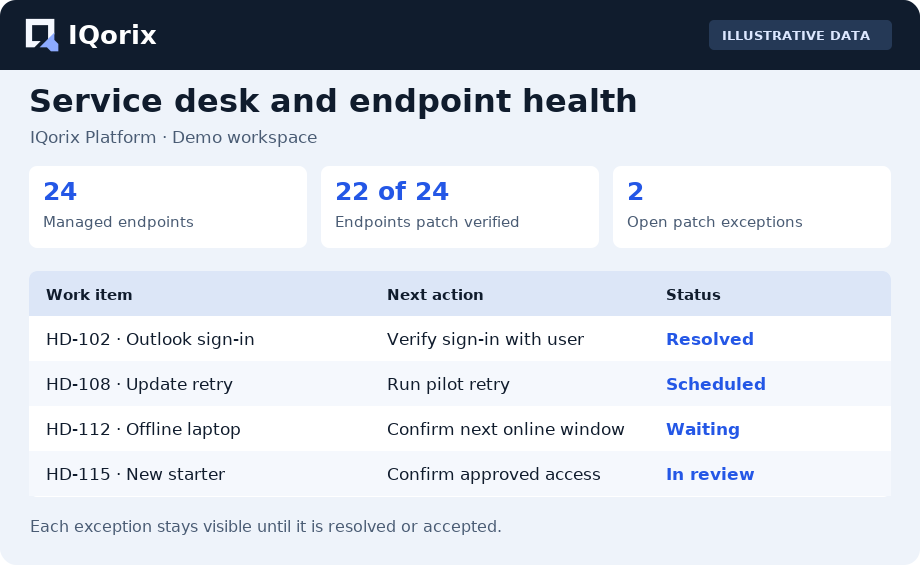
We start with the approved asset list and a pilot. Once onboarded, the IQorix Platform connects service requests, endpoint alerts, patch exceptions, and remote troubleshooting. Each item has an owner and a next action. At the service review, we explain repeat issues and recommend fixes.
Explore onboarding and sample dashboards
Mobile device management for phones and tablets
If a security alert needs deeper review, we can scope a confidential investigation. Explore cyber and network investigations
Support people can actually use.
Requests are captured, categorized, assigned, escalated, and documented from first contact through closure. The goal is simple: fast help without losing accountability.
- Email and portal-based ticket intake
- Priority, status, SLA, and escalation workflows
- Remote troubleshooting and scheduled appointments
- User and asset history available to the technician
- Automated updates and documented resolution notes
- Recurring issue analysis and improvement recommendations
Handle routine work automatically. Escalate what needs a person.
Policies can trigger remediation, scripts, messages, tickets, or technician review. IQorix uses automation to improve consistency—not to hide behind a bot.
- Standard workstation and server maintenance policies
- Event, process, service, disk, and performance alerts
- Custom scripts and scheduled tasks
- Automatic ticket creation and assignment
- Maintenance windows and reboot coordination
- Client-specific exceptions and approval workflows
Use IQorix as your IT team or extend the one you have
Start with a conversation about users, devices, sites, support hours, and what your team already owns. We define ongoing responsibilities and escalation coverage in writing, then agree on onboarding priorities and how we’ll report results.
Every engagement starts with scope, ownership, priorities, escalation paths, and an onboarding plan.
Fully managed
Day-to-day IT operations, support, monitoring, maintenance, and strategy under one service relationship.
Co-managed
We extend your internal team with tools, coverage, escalation, projects, or specialized capabilities.
Project & field support
Defined work such as migrations, remediation, deployments, on-site visits, or documentation.
Let’s build the support model around your business.
WORK FROM ANYWHERE
One team.
Every workplace.
In the office, working from home, or moving between both: your people need dependable access and responsive IT support.
We support remote and work-from-home employees with device setup, secure access, Microsoft 365 collaboration, troubleshooting, and onboarding and offboarding. We can also help connect on-premises systems with cloud services.
Explore remote & hybrid support →